
Key Takeaways
-
1Your Contact Page Is a Trust and Ranking Signal: Google uses it to confirm your business is real, and customers use it to decide if you're worth reaching out to.
-
2Target Branded Keywords, Not Service Keywords: Chasing the same phrases as your service pages causes keyword cannibalisation and weakens both.
-
3NAP Consistency Is Non-Negotiable: Your name, address, and phone number must match exactly across your site, footer, and every directory listing.
-
4Trust Signals Turn Visitors Into Enquiries: Reviews, real team photos, credentials, and clear expectations all reduce hesitation at the final step.
-
5Short Forms Convert Better Than Long Ones: Three-field forms convert roughly twice as well as seven-field forms, so keep it to name, email, and message.
Most people build their contact page in five minutes flat.
A name. An address. A phone number. Maybe a form. Then they move on.
But here’s the thing. Your contact page might be the last page a visitor reads before they reach out. It might also be the very first page a stranger lands on.
That makes it one of the most important pages on your whole site.
This guide covers contact us page SEO from top to bottom, showing you how to write a contact page that ranks well, builds trust, and turns visitors into enquiries. You will learn what to include, how to structure it, and which mistakes to avoid.
Whether you’re starting from scratch or fixing an old page, you’ll find clear, practical steps here. No jargon. No fluff. Just what actually works.
Let’s get into it.
Why Your Contact Page Matters More Than You Think
Search engines pay close attention to your contact page.
Google uses it to confirm your business is real. It checks your name, address, and phone number against other listings online. This is part of how Google decides whether to trust you.
Customers do something similar. Before they ring you or fill out a form, they check your contact page for proof you’re legitimate.
Here’s a stat that backs this up.
Source: Google
So this page isn’t just a formality. It’s a trust signal, a ranking signal, and a conversion tool, all rolled into one. Getting SEO for your contact page right from the start means fewer fixes down the line, and more enquiries in the meantime.
⚠️ Warning
A contact page with mismatched details (wrong phone number, old address, different business name) can quietly cost you customers and rankings. Consumers who spot incorrect information often avoid the business altogether.
Your Contact Page Is Also a Landing Page
Here’s something a lot of business owners miss.
Visitors don’t always arrive on your homepage first. Many land on your contact page directly, straight from a blog post, a social media link, or a Google search.
That means your contact page needs to work almost like a landing page. It has to explain who you are, what you do, and why someone should trust you, all while making it dead simple to get in touch.
If your contact page is thin (just a name, a form, and nothing else) you’re wasting that opportunity. Worse, you might be handing Google a page with barely enough content to understand, let alone rank.
Contact Page SEO Essentials
Before you write a single word, it helps to know what search engines are actually looking for. This section covers the technical and keyword side of contact page SEO.
1. Best Keywords for a Contact Us Page
People often ask: what are the best keywords for a contact us page? Here’s the honest answer. You don’t need many, and you need to be careful which ones you pick.
Your contact page isn’t meant to rank for broad, competitive terms. That’s what your homepage and service pages are for.
If you chase the same service-plus-location phrases on both pages, you risk keyword cannibalisation, where two of your own pages compete against each other in search results instead of your competitors.
⚠️ Warning
Avoid targeting phrases like "[service] in [city]" on your contact page if a service page already targets that exact phrase. This confuses Google about which page to rank, and can weaken both.
Instead, keep your contact page focused on branded and navigational terms. These are searches people make when they already know who you are and just need to find you.
Good keyword ideas include:
- “Contact [Your Business Name]”
- “[Your Business Name] phone number” or “[Your Business Name] email”
- “[Your Business Name] near me”
- “Where is [Your Business Name] located”
- “[Your Business Name] opening hours”
Notice the pattern. Every phrase includes your brand name. That’s the safest, most natural territory for a contact page to own, without stepping on your service pages’ toes.
You don’t need to repeat these phrases over and over. One or two natural mentions in a short paragraph is plenty.
Here’s an example of natural keyword use:
“Looking for OmniSEO Agency? You’ll find us at 2 The Ponds Boulevard, The Ponds, just off the main stretch near Norwest.“
That sentence answers a real, branded search. It also happens to include useful, local language search engines can understand, without duplicating what your service pages are already trying to rank for.
2. Writing Your Title Tag
This is where a lot of businesses fall short. They spend hours on their homepage title tag, then leave their contact page title as “Contact Us — [Business Name]” without a second thought. You can do better.
Your title tag should be:
- Around 50–60 characters long
- Front-loaded with your main point
- Written for humans, not just search engines
- Inclusive of your brand name
A strong example:
“Contact Us | OmniSEO Agency – Book a Free Quote Today”
Avoid a title that gets cut off. Google will chop anything past roughly 60 characters, so keep your most important words at the start.
3. Writing Your Meta Description
Your meta description should be under 160 characters. It should confirm to searchers they’ve found exactly what they were looking for.
Use action words. Tell people what they can do on the page. This is your one chance to earn the click before someone scrolls past you entirely.
A weak example: “This is the contact page for our business.”
A strong example: “Get in touch with [Business Name] today. Call, email, or fill out our quick form for a fast response.”
A strong contact us meta description does more than describe the page, it invites the click.
4. Your H1 Heading
Keep your main heading clear and simple. You don’t need to get clever here.
“Contact Us,” “Get In Touch,” or “Reach Out To Our Team” all work fine. If it fits naturally, you can add your location too: “Contact Our Sydney Team.”
5. Adding Schema Markup
Schema markup is code that helps search engines understand your page. Think of it as a translator between your website and Google.
Adding “ContactPage” schema tells search engines exactly what your page contains: your business name, address, phone number, and hours.
Source: Search Engine Watch
6. Embedding the Correct Google Map
Don’t just drop a pin on your street address. Instead, embed the map straight from your actual Google Business Profile.
Here’s why that matters. When someone clicks “Get Directions” from your embedded map, it sends an engagement signal directly to your Business Profile. That can help your local rankings.
To do this:
- Search for your business name on Google Maps
- Open your Business Profile
- Click Share, then Embed a Map
- Copy the code onto your contact page
7. Keeping NAP Consistent Sitewide
Your name, address, and phone number should be identical everywhere on your site and across the web. Not similar. Identical.
Even small differences confuse search engines. A missing suite number. A slightly different business name. An old phone number in your footer. These small things add up.
Check your NAP in these places:
- Your contact page
- Your website footer
- Your Google Business Profile
- Any directory listings (Yelp, Yellow Pages, industry directories)
They should all say the same thing, word for word, number for number.
How to Write a Contact Page
With the SEO groundwork sorted, it’s time to focus on what actually goes on the page. This is where you turn a technically sound page into one visitors genuinely want to use.
What to Include: The Essentials
Every good contact page needs a few non-negotiable elements. Miss these, and you’re leaving both rankings and customers on the table.
1. Hours of Operation
List your opening hours clearly. Include public holidays and seasonal changes too.
This helps Google show “open now” in search results. It also stops annoyed customers turning up to a locked door.
A simple table works well here.
| Day | Hours |
|---|---|
| Monday–Friday | 9:00 AM – 5:00 PM |
| Saturday | 10:00 AM – 2:00 PM |
| Sunday | Closed |
| Public Holidays | Closed |
2. A Contact Form or Chat Option
A form gives visitors an easy way to reach you, any time of day.
Keep it short. Ask only for what you need: name, email, and message. Maybe a phone number if you need to call people back.
Source: Foundry CRO
3. Service Areas
Tell visitors exactly where you operate. This helps both Google and your customers understand your reach.
If you serve multiple suburbs, cities, or regions, list them. This is also a natural spot to work in local keywords, without forcing it.
4. A Clear Call to Action
Don’t leave people guessing what to do next. Tell them.
“Call us now.” “Send us a message.” “Book your free consultation.” Simple, direct, and easy to spot.
5. A Short Business Summary
Add two or three sentences explaining what you do and who you help. This is especially useful for visitors landing on this page for the first time.
Think of it as a tiny version of your About page. Just enough context, nothing overwhelming.
6. Social Media Links
Even if these already sit in your footer, add them here too. Some visitors specifically look for social proof or want to message you through a channel they already use.
7. Any Extra Ways to Reach You
Do you offer live chat? A booking calendar? A support ticket system? List every option you offer.
The easier you make it for someone to choose their preferred contact method, the more likely they are to actually use it.
Building Trust: Reviews, People, Credentials & Expectations
Getting found is only half the job. Once someone lands on your page, you need them to trust you enough to reach out.
Add Testimonials or Reviews
People check reviews before deciding to contact a business. Adding a few testimonials directly on your contact page reassures last-minute visitors.
Include names, photos, or locations where you can. This makes reviews feel real, not staged.
Source: Northwestern
Show Real People
List the team members customers will actually deal with, especially support or sales staff. A face and a name go a long way toward building confidence.
You don’t need your entire staff directory here. Just the people customers are likely to speak with.
Add Photos of Your Location
If you have a physical location, show it. Photos of your storefront, office, or workspace help people feel confident before they visit.
Even online-only businesses benefit from showing behind-the-scenes photos. It humanises the brand.
List Credentials and Associations
Are you part of an industry association? A local chamber of commerce? Do you hold any certifications?
List them. Link to them where possible. These small trust markers add credibility, especially for service-based businesses.
Add Awards and Media Mentions
If your business has won an award or been featured in the press, mention it here too.
Link each one back to the original article or award page where you can. This adds credibility, and it creates a natural, genuine external link from your site.
Set Clear Expectations
Tell visitors what happens after they contact you.
- How long until they hear back?
- Who will respond?
- What are the next steps?
This small addition removes uncertainty; and uncertainty is one of the biggest reasons people hesitate to submit a form.
Add Internal Links to Useful Pages
Link to your help centre, FAQ page, or relevant service pages. This gives visitors somewhere else to go if they’re not quite ready to reach out.
It also helps Google understand how your site fits together. Internal links are simple, but they carry real weight for both users and search engines.
If you sell products made by other brands, you can link out to suppliers too. External links, used sparingly and in context, can boost trust rather than hurt it.
Contact Form Best Practices
Your form is often the main event on this page. Get it right.
Keep Fields to a Minimum
Every extra field lowers your chances of a completed submission. Stick to what you truly need.
For most businesses, that’s:
- Name
- Email address
- Message or enquiry type
Only add a phone number field if you plan to call people back.
Add a Clear, Repeated Call to Action
Your submit button shouldn’t just say “Submit.” Try something more specific, like “Send My Message” or “Get My Free Quote.”
Prevent Spam Without Annoying Real Visitors
Nobody enjoys a form flooded with spam. But nobody enjoys an impossible CAPTCHA either.
Use lightweight spam protection. A simple checkbox or invisible reCAPTCHA usually does the job without frustrating genuine visitors.
Offer a Backup Contact Method
Some people just don’t like forms. Always list an email address or phone number as a backup option, even if your form is front and centre.
Copywriting the Page: Headline, About & FAQs
Numbers and technical settings matter, but words matter too. Here’s how to write the copy that ties everything together, and if writing isn’t your strength, this is exactly the kind of task SEO content writing services are built to handle.
Start With a Strong Headline
Skip the generic “Contact Us” if you can. A slightly more specific or personal headline stands out and pulls readers in.
Try something like: “Let’s Chat About Your Project” or “We’d Love To Hear From You.”
If it fits naturally, work in a keyword too, such as your location or main service. But don’t force it if it breaks the tone.
Add a Short "About" Section
Not everyone landing on your contact page has read your homepage first. Some arrive straight from a blog post, a Google search, or a social link.
Give them a short reminder of who you are and what you do. Two or three sentences is enough.
Include an FAQ Section (The Right Kind)
Your contact page FAQ should answer logistical questions, not sales questions.
Good FAQ topics:
- “How quickly will you respond?”
- “Do you offer phone consultations?”
- “What information should I include in my message?”
Skip questions like “What do you charge?” or “What services do you offer?” Those belong on your services or pricing pages instead.
Invite Visitors to Stick Around
Not every visitor is ready to contact you yet. Give them another way to stay connected.
This could be a link to your blog, a newsletter signup, or a case study. Don’t let a hesitant visitor leave with nothing.
Local & Multi-Location Content
If you serve a local area, this section is especially important for you.
Mention Your Neighbourhood or Region
If you’re based in a well-known area, mention it. This is genuinely useful information, and it also strengthens your local relevance.
List Amenities and Attributes
Think about details your customers care about: wheelchair access, free parking, pet-friendly spaces, outdoor seating, or home delivery.
These small details matter more than ever, especially as more people use conversational, AI-powered searches like “cafes near me with wheelchair access and WiFi.”
Highlight What Makes You Different
Do you offer a satisfaction guarantee? Price matching? Same-day service? A quick mention here can tip a hesitant visitor toward contacting you.
Multiple Locations or Departments
If you run more than one location, or split enquiries across departments like sales, support, and billing, make that clear from the start.
Don’t force visitors to guess which number or email applies to them. A short menu of options (by location or by department) saves everyone time and reduces frustrated, misdirected messages.
For businesses with many locations, consider a general contact page plus individual location pages, each with its own accurate NAP details and local content.
This keeps each page focused. A general contact page can handle broad enquiries, while each location page owns its own local search visibility.
Real Examples of Excellent Contact Pages
Let’s look at what separates an average contact page of a website from a genuinely great one.
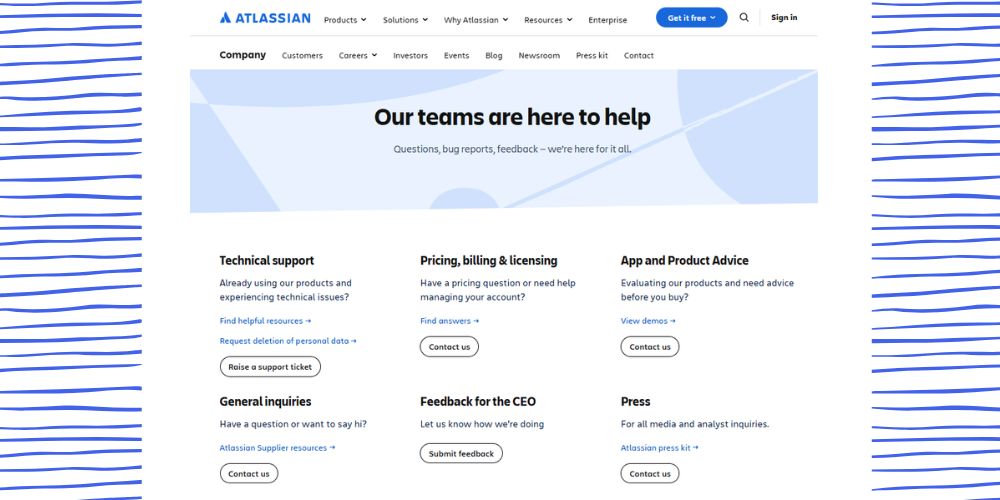
Example Pattern 1: The Self-Service Model
Some larger businesses lead with a help centre or FAQ before showing contact details. This reduces support workload while still giving customers a clear path to reach a real person if needed.
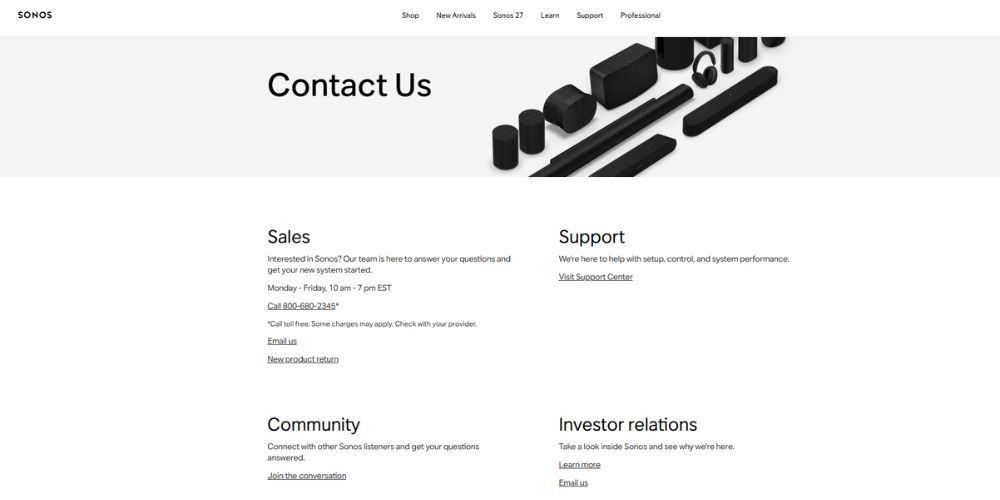
Example Pattern 2: The Community-Led Model
Other brands lean on community forums, encouraging customers to ask questions publicly. This builds trust because people see others have faced (and solved) similar issues.
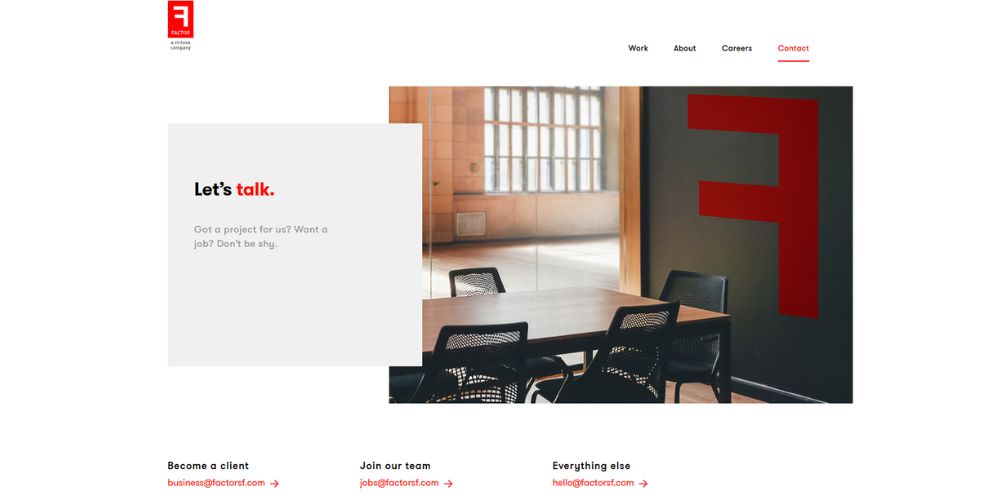
Example Pattern 3: The Simple and Clear Model
Smaller businesses often do best with a stripped-back approach: clear NAP details, a short form, and maybe one or two trust signals like reviews or certifications. No fluff, no distractions.
Example Pattern 4: The Detail-Rich Local Model
Local service businesses (think mechanics, clinics, or trades) often benefit from showing detailed NAP information, current-day trading hours, registration numbers, and a Google Map, all above the fold.
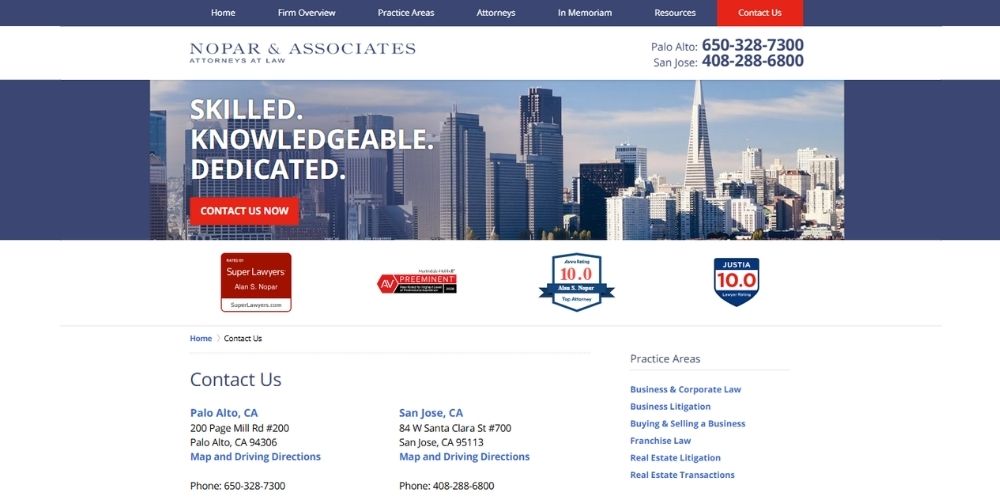
Whichever pattern fits your business, the same principles from earlier still apply underneath the design. Accurate NAP details, a working form, and clear trust signals matter no matter how the page is laid out.
Common Contact Page Mistakes to Avoid
Even well-meaning businesses trip up here. A great contact page can lose all its value over one small, overlooked mistake. Watch out for these.
- Blank or generic meta descriptions. This leaves Google to guess, and it usually guesses badly.
- Mismatched NAP details. Even tiny inconsistencies confuse both customers and search engines.
- Overly long contact forms. More fields mean fewer completed submissions.
- No clear call to action. Don’t make visitors guess what to do next.
- Treating the page as a second sales pitch. This page should help people reach you, not sell to them all over again.
- Skipping mobile testing. A huge share of “near me” searches happen on phones. If your form or map doesn’t work on mobile, you’re losing enquiries.
- Forgetting to update seasonal hours. An outdated holiday notice damages trust fast.
Bringing It All Together
Your contact page isn’t just a formality tacked onto the end of your site.
It’s proof to Google that your business is real. It’s proof to customers that you’re worth trusting. And for a lot of visitors, it’s the deciding factor between reaching out and quietly clicking away.
A quick recap before you go:
- Keep your NAP consistent everywhere, always.
- Write short, clear copy that answers real questions.
- Add trust signals like reviews, credentials, and team photos.
- Use schema markup and an embedded map tied to your Business Profile.
- Keep your form short and your call to action obvious.
- Target branded keywords here, and leave service-plus-location keywords to your service pages.
Get these pieces right, and your contact page stops being an afterthought. It becomes one of the hardest-working pages on your entire site, quietly building trust with Google and customers at the same time.
Source: Backlinko
Now it’s your turn. Pull up your current contact page and check it against everything above. Chances are, there’s at least one quick win waiting for you.
FAQs
How do I write a contact page for SEO?
Start with the basics: your name, address, phone number, hours, and a short form. Then add a title tag, meta description, and a couple of natural, branded keywords. Round it off with trust signals like reviews or team photos.
What should every contact page of a website include?
At minimum, include your NAP details, a contact form, hours of operation, and a clear call to action. Stronger pages also add a short business summary, an FAQ, and a map tied to your Google Business Profile.
Is it hard to create a contact page?
Not at all. Creating a contact page is one of the simpler pages to build. The hard part isn’t the setup, it’s remembering to optimise it properly instead of leaving it as an afterthought.
How long should a contact page be?
There’s no strict rule, but aiming for a few hundred words of genuine, useful content helps avoid a “thin content” page. Just don’t pad it out with fluff. Every sentence should earn its place.
Do I need a keyword strategy for my contact page?
Only a light one. Mention your business name and location naturally, once or twice. Avoid targeting the same service keywords your service pages already rank for, or you risk the two pages competing with each other.
Does contact page SEO really help local search rankings?
Yes. Accurate NAP details, schema markup, and a properly embedded map all send strong local relevance signals to Google, which can help your visibility in local search results and the map pack.
How do I make a contact page that actually converts?
Focus on the basics first: accurate NAP details, a short form, and a clear call to action. From there, add trust signals like reviews or team photos, and keep the copy simple enough that visitors know exactly what to do next.
Want Your Contact Page Working as Hard as the Rest of Your Site?
Our team builds contact pages that rank, build trust, and actually convert, not just a form nobody fills out. See how we approach SEO that gets your whole site working together.
👉 Talk to Our SEO Team