
Key Takeaways
-
1Placement Beats Presence: Where a keyword sits matters more than how many times it appears on the page.
-
2Eight Core Locations Do Most of the Work: Title tags, meta descriptions, URLs, headings, body copy, images, and internal and external links.
-
3Proximity Matters as Much as Placement: Keeping your target phrase together, rather than scattered, helps search engines match it to real queries.
-
4Search Intent Should Guide Every Placement Decision: A blog page, a service page, and a product page all need keywords placed differently.
-
5AI Search Has Changed the Rules: Placing clear answers near your keywords now matters for AI Overviews and tools like ChatGPT, not just Google's blue links.
Most businesses spend hours finding the right keywords. Then they scatter them across a page and hope for the best.
That’s where things go wrong.
Keyword research tells you what to target. Keyword placement tells you where to put it so it actually works.
Get this right, and your content becomes easier for Google to understand and easier for your reader to trust. Get it wrong, and even great keywords go to waste.
This guide walks you through exactly where to place your keywords, why it matters, and the small technical details most guides skip.
If you’ve been searching for how to place keywords or where to put SEO keywords, this is the guide to bookmark.
What Is Keyword Placement, and Why Does It Matter?
Keyword placement is where you put your target words and phrases on a page.
It sounds simple. But it’s one of the most misunderstood parts of SEO.
In the early 2010s, marketers repeated keywords over and over. This was called keyword stuffing. It worked for a while.
It doesn’t work anymore.
Google now reads content the way a person does. It looks at meaning, not just word matches.
That means your placement needs to feel natural. Not forced. Not robotic.
Good keyword placement does two jobs at once. It tells Google what your page is about. And it tells your reader they’re in the right place.
Before You Place Keywords: Get Your Research and Intent Right
You can’t place a keyword well if you picked the wrong one.
Before you write a single word, understand two things. Where to add keywords for SEO only makes sense once you know what your customer is searching for. And why they’re searching for it.
There are four main types of search intent:
- Informational – the searcher wants to learn something
- Navigational – they’re trying to find a specific site or page
- Commercial – they’re comparing options before they buy
- Transactional – they’re ready to buy right now
Match your keyword and your placement to the right intent. A blog post and a product page should never be optimised the same way.
Where to Place Keywords: The 8 Core Locations
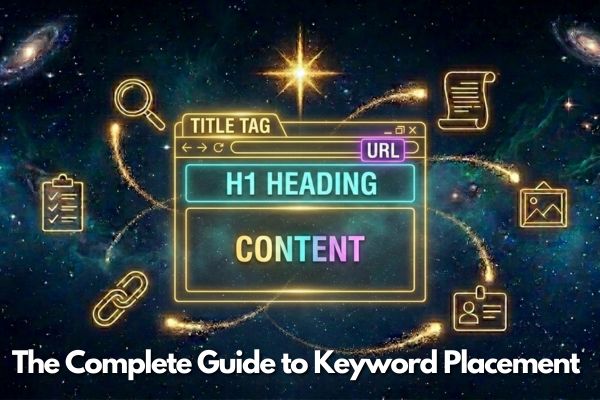
This is the part most guides get right, but rarely explain clearly. If you’ve been wondering how to use keywords for SEO in practice, or where to use keywords for SEO across a page, here’s where they should actually live.
1. Title Tags
Your title tag is the blue link people see in Google. It’s often the first thing that decides whether someone clicks.
Put your main keyword near the start of the title. This helps both Google and your reader understand the page fast.
Source: Backlinko
Keep your title between 50 and 60 characters. Titles between 15 and 40 characters see an 8.6% higher CTR than longer ones.
⚠️ Warning
Google rewrites titles it thinks don't match the page well. Studies show this happens to around 76% of titles. Matching your title to your H1 heading cuts that rate to about 20.6%.
2. Meta Descriptions
Your meta description doesn’t directly affect rankings. But it heavily affects whether someone clicks.
Think of it as your ad copy. It’s your chance to earn the click, not just the impression.
Source: Landingi
Keep your description between 140 and 160 characters. Put your keyword and your value proposition early, since mobile often cuts descriptions off sooner.
3. URL Structure
Your URL should be short, clear, and include your primary keyword.
Avoid random numbers, symbols, or long strings. A clean URL is easier for people to read and easier for Google to understand.
Once a URL is live, try not to change it. Every change risks a redirect, and redirects can quietly leak ranking value.
Source: AIOSEO
4. Headings (H1, H2, H3)
Headings are signposts. They tell Google what each section covers. They tell your reader where to look.
Put your main keyword in your H1 where it reads naturally. Use related terms and variations in your H2s and H3s.
Don’t force the exact same phrase into every heading. It reads as spammy, and it wastes a chance to cover a wider range of related terms.
5. Body Content
This is where most of your writing lives, and where placement takes the most care.
Introduce your primary keyword early, ideally in your first paragraph or two. This confirms to both Google and your reader that they’re on the right page.
After that, write naturally. Use your keyword where it fits. Use related terms everywhere else.
6. Images and Alt Text
Alt text describes your image to search engines and to people using screen readers.
Describe the image honestly. Add your keyword only if it genuinely fits.
Avoid generic file names like “image1.jpg”. Rename your files with real, descriptive words before you upload them.
7. Internal Links and Anchor Text
Internal links connect your pages together. They also spread authority across your site.
Use descriptive anchor text. Avoid using the exact same phrase every time you link to a page, since this can look manipulative to Google.
Link because it genuinely helps your reader. Not because it’s a chance to fit in another keyword.
Source: Upward Engine
8. External Link Anchor Text
When you link out to a source, use anchor text that reflects what that page is actually about.
This isn’t just polite. It helps Google understand the context of your own content too.
Using Keyword Variations and Semantic Terms
Exact-match keywords still matter. But relying on them alone limits how much of the topic you actually cover.
Modern search engines expect real depth. That means using related words, synonyms, and closely connected phrases throughout your content.
For example, a page targeting “keyword placement” should also naturally mention terms like on-page SEO, search intent, and content optimisation.
This is called semantic search. It’s Google’s way of understanding meaning, not just matching words.
Density, Proximity, and N-Grams
You’ve probably heard the term “keyword density.” It’s the percentage of times a keyword appears compared to your total word count.
We won’t go deep into density here, since we’ve covered exact ratios and best practices in a separate guide. The short version: there’s no magic percentage. Write naturally, and density takes care of itself.
Keyword proximity is different, and it deserves more attention than it usually gets.
Proximity is how close your target words sit to each other. If you’re targeting “SEO agency Sydney”, it helps when those words appear close together, not scattered across a paragraph.
It works the same way for a service like SEO content writing in Sydney, NSW, keeping the phrase whole rather than splitting the location from the service tends to match how people actually search.
| Example | Keyword Proximity | Likely Impact |
|---|---|---|
| "Our SEO agency in Sydney helps local businesses grow" | Close together | Stronger match to the exact search phrase |
| "Our SEO team, based across Sydney and other cities, is an agency built for growth" | Spread apart | Weaker match, even though all the words are present |
This connects to a concept called n-grams. An n-gram is just a chunk of words search engines read as a unit.
A single word is a unigram. Two words together is a bigram. Three words together is a trigram.
Search engines often match search queries to these chunks, not just single words. This is the real reason proximity still matters, even in a world of semantic search.
Matching Placement to Search Intent by Page Type
Placement isn’t one-size-fits-all. Different page types need different approaches.
- Blog and informational pages can use keywords more freely in headings and explanations. If you’ve asked yourself where should you include keywords on a blog specifically, start with your H1 and opening paragraph, then let related terms carry the rest.
- Service pages should prioritise clarity and benefits over keyword density.
- Product pages need a balance of description and clear buying signals.
Before you place a single keyword, ask what your reader wants to achieve on that exact page. Let that answer guide your placement.
Common Keyword Placement Mistakes to Avoid
Even experienced marketers slip into old habits. Watch for these:
- Keyword stuffing – repeating a phrase far more than feels natural
- Over-optimisation – forcing an exact match into every heading and sentence
- Ignoring readability – writing for a search engine instead of a person
- Inconsistent targeting – mixing unrelated keywords on one page
- Neglecting old content – leaving pages untouched as search intent shifts over time
⚠️ Worth Flagging
If your writing sounds unnatural when read aloud, that's usually a sign of over-optimisation. Fix it before you publish, not after rankings drop.
Keyword Placement for AI Search: What's Changed
Traditional SEO advice was written for blue links. AI search plays by slightly different rules.
Tools like Google AI Overviews, ChatGPT, and Perplexity pull answers directly from your content. That means placement now needs to serve two audiences: search engines and AI systems.
Source: Ahrefs
To place keywords well for AI search:
- Put a clear, direct answer right after each heading, not buried three paragraphs down
- Structure sections as simple question-and-answer blocks where it makes sense
- Keep your target phrase close to the actual answer, not just somewhere on the page
Schema Markup: The Placement Layer Most People Forget
Schema markup is structured data you add to your page’s code. It doesn’t change what your reader sees, but it changes what search engines and AI systems understand.
FAQ schema, HowTo schema, and Article schema all let you reinforce your keywords in a format machines read directly, separate from your body copy.
This matters more now than ever. AI systems often lean on structured data to confirm what a page is actually about.
Measuring and Refining Your Keyword Placement
Keyword placement isn’t something you set once and forget. It needs regular checking.
Watch these four signals over time:
- Rankings for your primary and secondary keywords
- Click-through rate from the search results
- Engagement, like time on page and bounce rate
- Conversions, where that applies to the page
If a page ranks well but gets few clicks, revisit your title tag and meta description first. If it gets clicks but people leave quickly, look at your headings and body content instead.
| Problem | Likely Fix |
|---|---|
| Good ranking, low clicks | Rewrite title tag and meta description |
| Good clicks, high bounce rate | Revisit headings and opening paragraph |
| Traffic but low conversions | Check placement against actual search intent |
FAQs
Where should I place my main keyword on a page?
Your primary keyword should appear in your title tag, H1, URL, and the first paragraph or two of your body content. After that, use it naturally through the page and rely on related terms and variations elsewhere.
Does keyword placement still matter with semantic search?
Yes. Google understands meaning now, not just exact matches, but it still uses placement and keyword proximity to confirm what a page is about. Semantic search complements placement, it doesn’t replace it.
What's the difference between keyword density and keyword proximity?
Density is how often a keyword appears relative to your total word count, and it’s largely outdated as a ranking factor. Proximity is how close the words in your target phrase sit to each other, and it still matters because search engines match queries to word chunks called n-grams.
Do meta descriptions affect rankings?
Not directly. Meta descriptions don’t influence where you rank, but they strongly influence whether someone clicks your result, which indirectly affects traffic and performance.
Should I place keywords the same way on every page?
No. Placement should match the page’s search intent. Blog posts can use keywords more freely across headings and explanations, while service and product pages should prioritise clarity and buying signals over keyword frequency.
How does keyword placement work for AI search tools like ChatGPT or AI Overviews?
Place a clear, direct answer right after each heading rather than burying it in the middle of a paragraph. AI tools tend to pull the first sentence of a section, so keeping your keyword close to that answer improves your chances of being cited.
Can bad keyword placement hurt my rankings?
Yes. Keyword stuffing, forcing exact-match phrases into every heading, or scattering related words across a sentence instead of keeping them close together can all weaken relevance signals and hurt readability, which affects both rankings and conversions.
Conclusion
Keyword placement isn’t about tricking a search engine. It’s about making your content genuinely clear.
Place your keywords where they naturally belong. Write for your reader first, and let good placement follow from that.
That’s really the whole answer to where to put SEO keywords: wherever they help the reader most, not wherever you can squeeze them in.
Do this consistently, and you won’t just rank better. You’ll build content people actually want to read.
Want Your Keywords Placed Right, the First Time?
Our team builds every page around natural, intent-matched keyword placement, not guesswork. See how we approach content that ranks and reads well.
👉 Talk to Our Content Team